7 Proven Ways to Improve Remote Team Communication Without Adding More Meetings
Last reviewed: June 2026
Remote teams do not fail because people are lazy. They fail when messages pile up in the wrong channels, context disappears between time zones, and every update turns into a calendar invite. Here is what actually works.
Remote work did not invent communication problems. It amplified them. When your teammate sits three desks away, you can lean over and clarify a confusing message in thirty seconds. When they are in Lisbon and you are in Chicago, that same confusion can sit unresolved for a full business day.
In our experience coaching distributed product, engineering, and customer-success teams, the teams that communicate well share one trait: they treat communication as a system, not a personality test. They decide where conversations live, how fast responses should happen, and what deserves a live call versus a thoughtful async update.
The seven practices below are not theory. We have seen them reduce misalignment, shorten decision cycles, and—most importantly—give people their calendars back.
1. Define Where Each Conversation Should Live
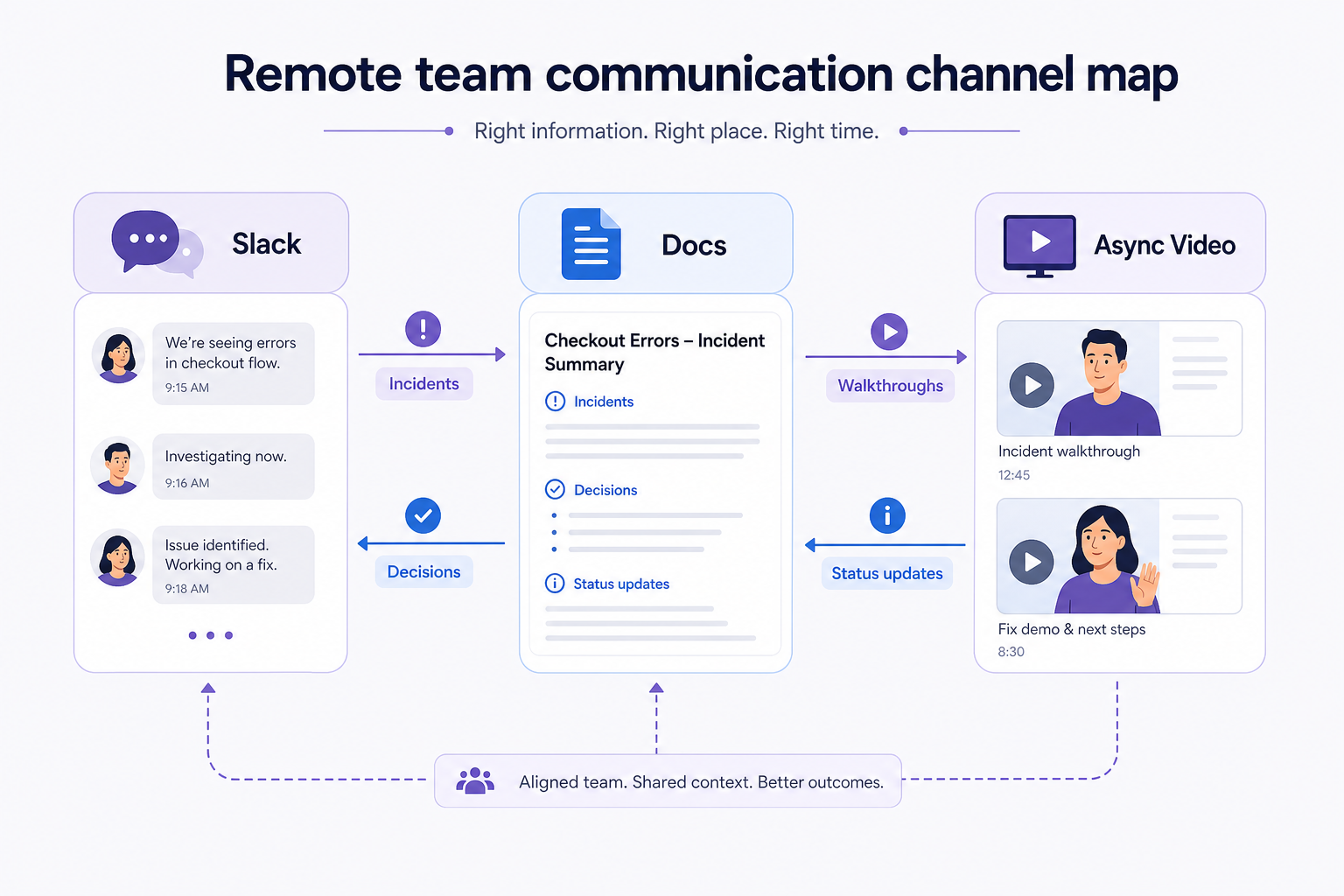
The fastest way to lose context on a remote team is to let the same topic bounce between Slack, email, a doc comment, and a meeting recap. Nobody knows which thread is the source of truth, so people re-ask questions that were already answered somewhere else.
A practical fix: create a lightweight channel map. Urgent production issues go to your incident channel. Design feedback lives in Figma comments or a dedicated design channel. Company-wide announcements use email or an internal wiki. Product decisions get documented in Notion or Confluence with a link posted once in Slack.
We worked with a twelve-person SaaS team that cut weekly confusion by nearly half after they wrote a one-page "where to post what" guide. Engineers stopped pasting bug details into DMs. Support stopped duplicating tickets in three places. The guide was not bureaucratic—it was six bullet points pinned in their team channel.
- Incident or outage: dedicated alert channel with on-call rotation
- Quick question to one person: DM, but summarize outcomes back to the group channel if others need the answer
- Decision that affects multiple teams: doc + single announcement message with the link
- Status update: async post in the team channel, not a standing meeting
2. Write for Someone Who Missed the Last Three Threads
Remote communication fails when messages assume shared context. "As we discussed" means nothing to someone who was on PTO. "The usual approach" means nothing to a new hire.
Write messages so a teammate who missed the last three threads can still act. That means leading with the goal, naming the decision needed, and linking supporting material. Instead of "Can someone look at the checkout bug?" try: "Checkout fails for EU customers on mobile Safari (ticket #4821). Repro steps in the ticket. Need a severity call by EOD Thursday so we can slot it into the sprint."
This habit sounds slow. It is faster than the back-and-forth it prevents. Our team found that messages structured with context → ask → deadline get responses two to three times faster than vague pings.
3. Replace Status Meetings with Async Check-Ins
Standing meetings often exist because managers want visibility, not because the work requires synchronous conversation. A thirty-minute daily standup across five time zones is not collaboration—it is schedule damage.
Try a written or recorded async check-in twice a week. Each person shares: what they finished, what they are doing next, and what is blocked. Blockers get a threaded reply or a short call only if needed. One engineering lead we know replaced five weekly standups with Loom-style updates and cut meeting time by six hours per person per month.
Live meetings still matter for brainstorming, sensitive feedback, and relationship building. The goal is not zero meetings. The goal is to stop using meetings as a default status dashboard.
- Keep async updates under three minutes to read or watch
- Surface blockers explicitly—do not bury them in prose
- Escalate to a call only when async has failed twice
4. Record Walkthroughs When Text Fails
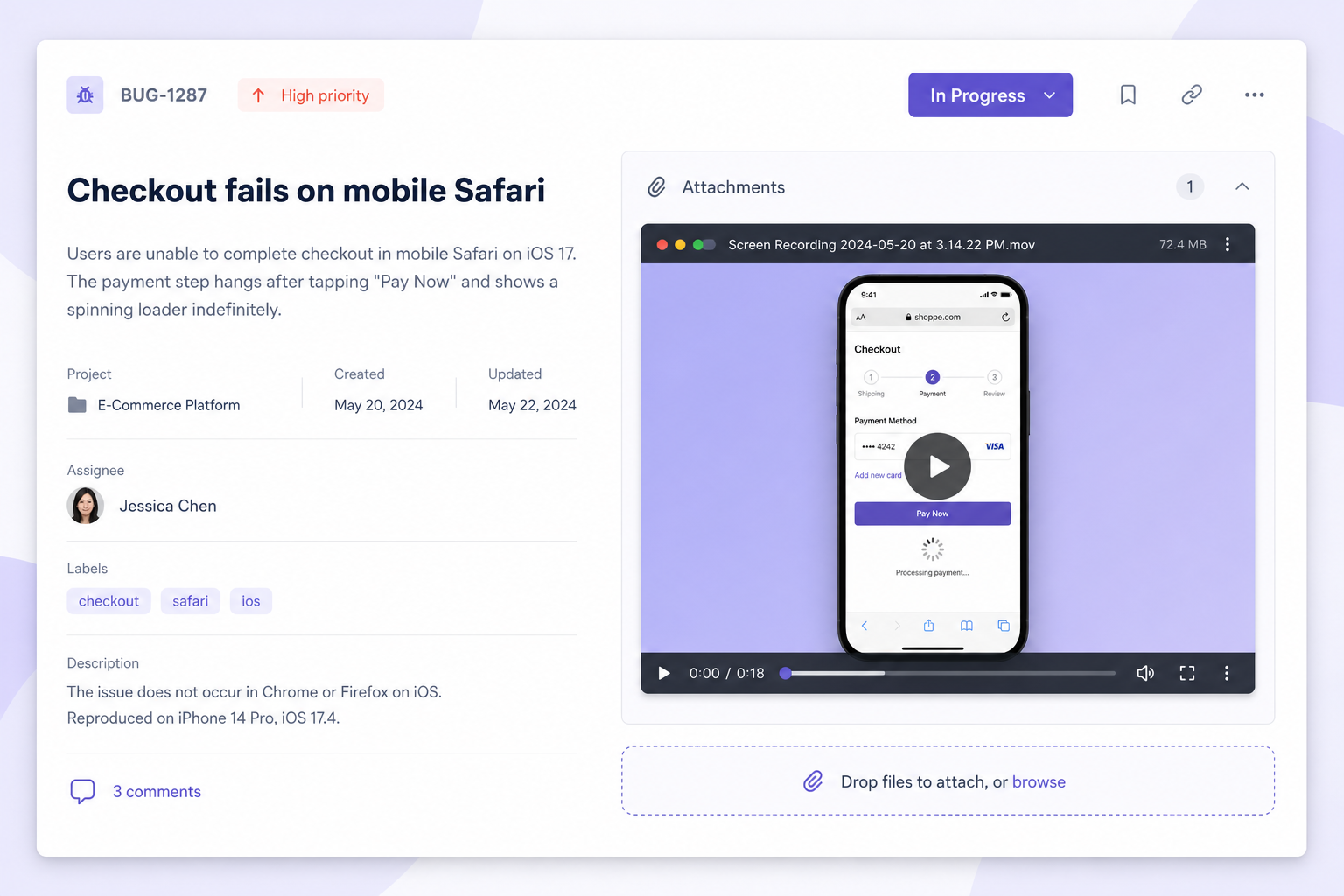
Some information does not survive copy-paste. UI bugs, workflow demos, design reviews, and onboarding tours need visual context. A paragraph describing where to click is almost always slower than a ninety-second screen recording.
When a support lead at a fintech startup started attaching short walkthrough videos to complex tickets, escalation rates dropped noticeably. Customers understood the fix. Internal teams stopped re-opening tickets because a screenshot missed the dropdown that only appeared on hover.
You do not need Hollywood production value. Clear audio, a clean screen, and a stated goal in the first ten seconds beat a polished but rambling ten-minute video every time.
5. Set Response-Time Expectations That Respect Deep Work
Remote teams burn out when every message is treated as urgent. Without norms, people either respond instantly and never focus, or go silent and seem unresponsive.
Publish simple response-time guidelines. Example: Slack messages get a same-day acknowledgment on business days; non-urgent items can receive a full reply within twenty-four hours. Email is next-day. True emergencies use the incident channel or phone.
Leaders set the tone. When managers reply to every message within ninety seconds, they signal that deep work is optional. When they batch responses and respect focus blocks, the rest of the team follows.
7. Review Communication Quarterly Like You Review Code
Communication systems drift. A channel that made sense for six people becomes noisy at sixty. A doc template nobody uses should be deleted, not ignored.
Every quarter, run a thirty-minute retro focused only on how you communicate—not what you shipped. Ask: Which channels are noisy? Where did we lose context last month? Which meetings could have been async?
Small adjustments compound. Removing one redundant weekly meeting and one unused Slack channel does not feel dramatic. Over a year, it returns hundreds of hours to the team.
Our Perspective & Real-World Experiments at theRec
When we built theRec, we were not trying to replace human conversation. We were trying to remove the meetings that existed only because screen context was hard to share. Last quarter, we ran an internal experiment: for four weeks, any update that previously would have triggered a "quick sync" had to be attempted async first—usually a short screen recording with a written summary.
The results surprised us. Roughly sixty percent of those would-be meetings never needed to happen. A three-minute recording showing a UI regression, attached to the ticket with a one-paragraph summary, resolved what used to be a thirty-minute call with six people half-listening. The remaining forty percent still went to live calls—but they were shorter because everyone arrived with shared context.
We also learned what did not work. Recordings longer than five minutes rarely got watched to the end unless they were training material. Updates without a clear ask in the first fifteen seconds got ignored. The winning format became a pattern we now recommend to every team using theRec: state the goal immediately, show the screen, end with the decision or action needed, and link the doc.
Better remote communication is not about more tools or more meetings. It is about clearer defaults: where messages live, how urgent they are, and when video beats text. Teams that get this right feel calmer, move faster, and actually use their synchronous time for work that deserves a live conversation.
If you are exploring async video as part of that system—quick screen recordings, shared walkthroughs, and updates people can watch on their own schedule—theRec is built for exactly that workflow. No installs, no friction, just record and share. When you are ready to try it, start with one use case: bug reports, release notes, or weekly team updates. See what disappears from your calendar.